


Most AI documentation tools give you an output and ask you to trust it.
CLIPr works differently. We believe in Transparent AI.
The Problem With The "Just Trust It" Model
When AI produces a report from an audio or video recording, the natural question is: how do I know this is right?
For professionals in high-stakes environments, that question isn't optional. Documentation has to be accurate. And accuracy requires review.
But reviewing everything, every time, takes time. And it defeats much of the purpose of AI-Assisted documentation in the first place.
What Transparent AI Does
CLIPr's Transparent AI solves this by showing its work.
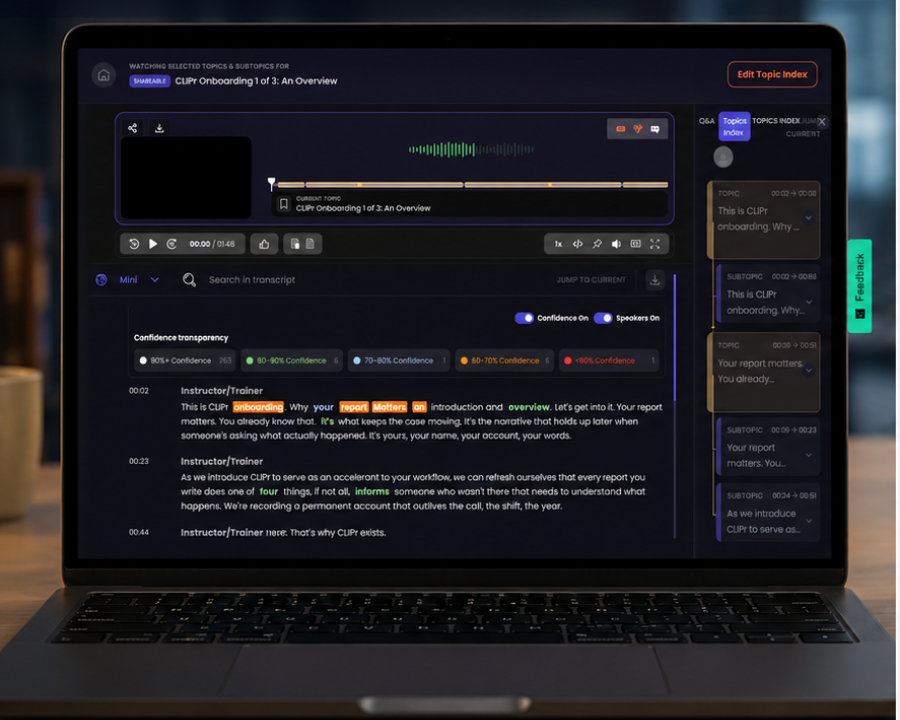
Every segment of a CLIPr transcript inside the CLIPr player carries a confidence score. This is a signal from CLIPr indicating how certain it is about what was captured. High confidence means CLIPr heard and structured the information clearly. Lower confidence means CLIPr flagged something it's less sure about and wants your attention there.
The result? Instead of reading through an entire report to find what needs verification, you go directly to what matters.
What This Looks Like in Practice
Imagine you've finished an incident report or a field inspection. CLIPr has produced a structured first-draft from your recording. Most of the report is clear…locations, times, materials, observations all captured with high confidence.
But one segment is flagged. A name was unclear. A number was ambiguous. CLIPr isn't guessing, it's telling you it isn't sure, and it's pointing you directly to the spot that needs your eye.
You confirm, correct if needed, and finalize. The whole review takes minutes, not an hour.
Still Human. Always.
Transparent AI isn't a replacement for professional judgment. It's designed to support it. You still review the report. You still determine what's accurate and complete. You still approve what goes in the final documentation.
CLIPr just makes sure you know exactly where to focus.
That's the difference between AI that gives you an answer and AI that shows you its reasoning.
Ready to see how CLIPr works for your team? Book a Demo
Try CLIPr Mobile → Download on the App Store or Download on Google Play